AI Scheduling Software for Construction

AI construction scheduling that drafts the plan in minutes and predicts delays in advance

Gantivity turns plain-language scope into a dependency-linked, calendar-aware CPM schedule — then keeps it alive with daily site progress, delay prediction, and AI-generated reports. This page explains what AI scheduling software actually does, and how it differs from static planning tools.

What is AI construction scheduling?

AI construction scheduling is the use of artificial intelligence across the full life of a project schedule: building it, checking it, and keeping it honest during execution. Instead of a scheduler manually creating hundreds of activities, wiring logic links, and re-running the network every month, the AI does the mechanical work — and the humans make the decisions that actually require judgement.

In practice, AI scheduling software for construction should do three distinct jobs:

  • Generate: convert scope — a plain-language description, a drawing register, an existing programme — into a structured work breakdown, with dependencies, durations, and working calendars, and compute the critical path.
  • Predict: read execution signals from the site (daily progress, issues, blocked tasks) and forecast which activities and milestones are trending late, before the slip becomes contractual.
  • Communicate: answer questions about the schedule in plain language, nudge assignees about pending work, and produce status, risk, and variance reports from live data rather than from last week's slide deck.

Gantivity was built to do all three. It is not an add-on assistant bolted onto a legacy planning tool — the AI is native to how schedules are created and how projects are run. If you are evaluating the broader category, our construction project management software page covers planning, field reporting, and communication together.

How AI schedule generation works in Gantivity Studio

Schedule generation happens in Gantivity Studio. The workflow is deliberately simple, because the point is to remove the barrier between knowing your scope and having a workable programme:

  1. Describe the scope in plain language. "Twelve-storey residential tower, raft foundation, two basement levels, MEP first fix from level 3 onward, façade starts after structure reaches level 6, monsoon shutdown in July." You can also start from a template or an existing plan.
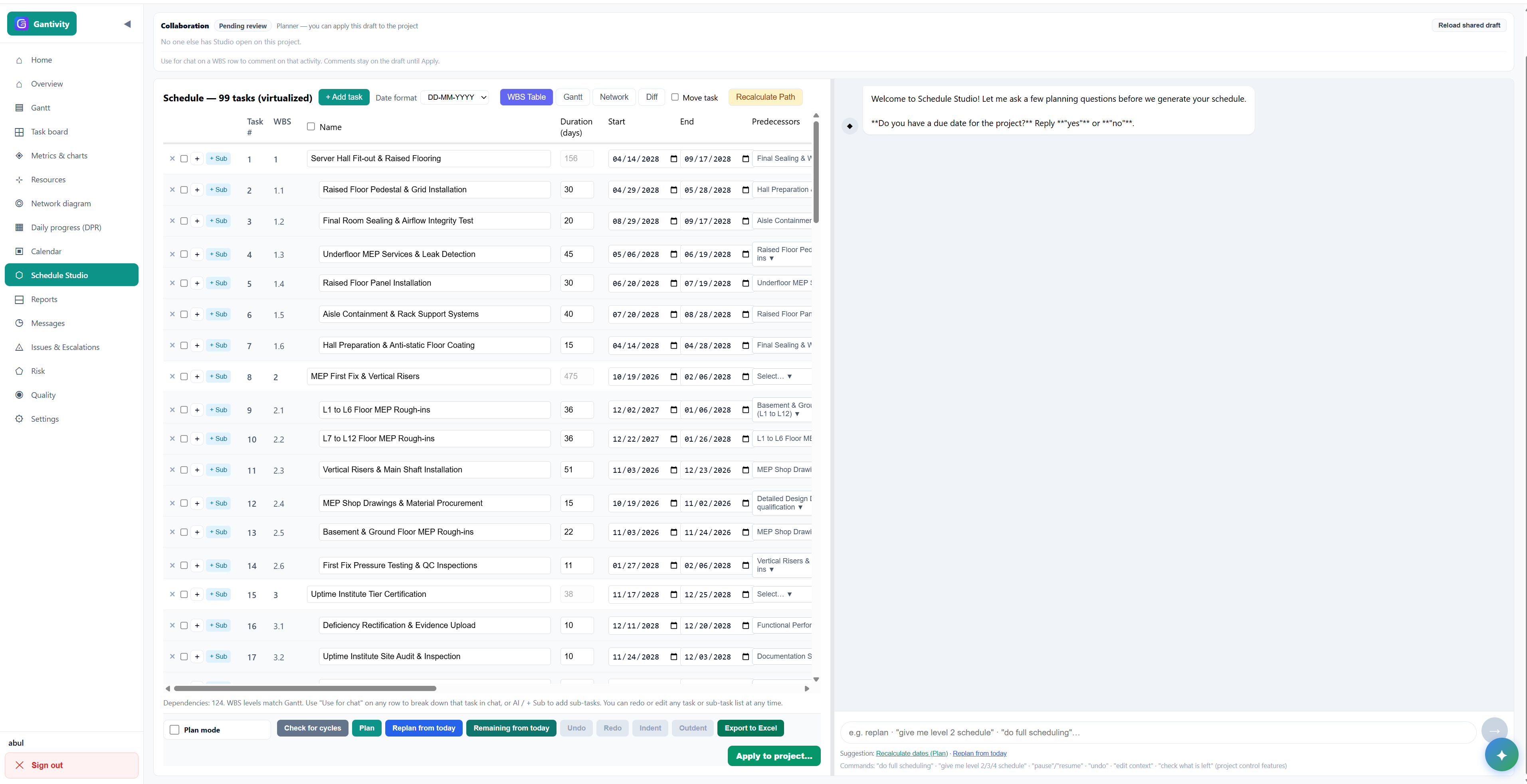
  2. The AI proposes a work breakdown structure. Studio builds WBS levels, tasks with realistic durations, finish-to-start and overlapping dependencies, and working calendars that respect your constraints.
  3. The critical path is computed and stress-tested. Gantivity highlights the driving chain of activities, flags areas where the logic looks fragile or the float is unrealistically thin, and lets you ask "what if this slips?" before you commit dates to a client.
  4. Iterate with the AI, then baseline. You refine sequencing, adjust durations, and split or merge phases in conversation — the network recalculates as you go. When it holds together, you commit the baseline and move into execution.

A first credible draft typically takes minutes, not weeks. That matters most at the moments schedules usually don't exist: bid stage, early works, subcontractor packages, and recovery planning after a major change.

Delay prediction: from lagging to leading indicators

Most construction schedules fail after the baseline, not before it. The plan is sound on day one; then progress reporting decays into WhatsApp messages and monthly updates, and by the time the schedule is formally revised, the delay is already three weeks old. This is the core argument of our project controls approach: measurement has to be continuous or prediction is impossible.

Gantivity closes that loop with daily progress reports from the field. Site engineers update tasks with notes, percent progress, and time, and can raise issues directly from the work face. Those execution signals feed the delay-prediction layer, which compares actual performance against planned rates and flags tasks, resources, and milestones that are trending late. Predicted slips appear on the Gantt, in dashboards, and through ZAI — the in-channel copilot you can ask "what's delayed this week?" or "which tasks block handover?"

Configurable auto-escalation completes the chain: when a critical issue sits unanswered, Gantivity escalates it through the levels you define, with a log of who was notified and when. Early warning is only useful if someone accountable actually sees it.
What changes when the schedule is alive

A static CPM file answers "what was the plan?" A living schedule answers "what is happening, and what happens next?"

Execution signals

Every task shows whether it is on track, behind, or blocked — computed from daily field updates, not from a monthly reconciliation exercise.

Continuous critical path

The driving chain of activities is recomputed as reality changes, so you always know which slips actually move the completion date and which ones just eat float.

AI reports on demand

Status, risk, weekly digests, and schedule-variance narratives generated from the live schedule — the Monday report writes itself, and it is current.

Smart Gantt

The schedule your site team actually updates

Dependency and calendar-aware Gantt with critical path highlighting, fed by daily progress from the field — plus Kanban for crews who work in flow.

  • AI-generated baseline from plain-language scope
  • Early overrun warnings on the driving path
  • Scenario planning: instant "what if we slip?" answers
Why our Gantt is different →
Gantivity Schedule Studio drafting a WBS with AI chat

How AI scheduling differs from static CPM tools

Traditional CPM tools — Microsoft Project, Primavera P6 — are excellent at representing a plan. Their limits show up in execution. The schedule lives on a specialist's machine; the site reports progress somewhere else entirely; and the two are reconciled monthly, if at all. The result is a schedule that is contractually authoritative and operationally stale at the same time.

AI scheduling software changes the shape of the work, not just the speed of it:

  • Creation: plain-language scope in, structured network out — versus manual activity entry and logic wiring by a trained scheduler.
  • Updates: continuous, from the people doing the work — versus periodic, from a status meeting two layers removed from the work face.
  • Analysis: forward-looking delay prediction — versus backward-looking variance discovered at the next update cycle.
  • Access: every stakeholder reads the same live picture — versus a licensed desktop file interpreted through PDF exports.

We keep the comparison honest — mature CPM engines have real strengths, and some organisations should keep them. See the detailed breakdowns in Gantivity vs Microsoft Project and Gantivity vs Primavera P6.

Who benefits from AI construction scheduling

General contractors

GCs carry the schedule risk and coordinate everyone else's. AI scheduling gives them a credible baseline at bid stage, a live view of subcontractor progress during execution, and early warning when a trade's slippage threatens the driving path — with escalation that doesn't depend on someone remembering to send an email.

Owners and developers

Owners rarely want to operate a scheduling tool; they want to know whether the date is safe. Gantivity's dashboards and AI reports give owners a defensible, current answer to "are we on track?" without waiting for the contractor's monthly narrative — and the issues register shows exactly where decisions are stuck.

Subcontractors

Subcontractors live downstream of other people's delays. A shared, live schedule shows them when their fronts will actually be ready, lets them log obstructions as issues with a timestamped history, and gives them evidence when delay was not of their making. The DPR workflow takes minutes a day from a phone.

Pricing is straightforward while we scale with design partners — see plans, or read more on the Gantivity blog.

AI construction scheduling: common questions

What is AI construction scheduling?
AI construction scheduling uses artificial intelligence to build and maintain a project schedule: it converts plain-language scope into a work breakdown structure with dependencies, durations, and calendars, computes the critical path, and then keeps the schedule current by reading daily progress from the field and flagging delays before they hit milestones.
How does Gantivity generate a schedule from plain language?
In Gantivity Studio you describe your scope — phases, key deliverables, constraints — in plain language. The AI proposes a structured WBS with tasks, logic links, durations, and working calendars, computes the Gantt-backed critical path, and lets you iterate and refine with the AI until the baseline is ready to commit.
Does AI scheduling replace a planner or scheduler?
No. AI scheduling removes the mechanical work — drafting the WBS, wiring dependencies, recalculating dates — so planners and project managers spend their time on sequencing decisions, constraint management, and mitigation. Teams without a dedicated scheduler get a credible CPM schedule they could not otherwise build.
How does delay prediction work in Gantivity?
Gantivity reads execution signals from daily progress reports, task status, and issue activity, compares actual performance against the plan, and flags tasks and milestones that are trending late — often weeks before a traditional monthly schedule update would catch them. Predicted slips surface on the Gantt, in dashboards, and through ZAI, the in-channel copilot.
Does Gantivity support the critical path method (CPM)?
Yes. Gantivity schedules are dependency and calendar aware, with a Gantt-backed critical path. The difference from static CPM tools is that the critical path is recomputed continuously from live field data rather than during a periodic update cycle.
How do we get access to Gantivity?
Gantivity is onboarding construction, infrastructure, and enterprise teams through an early access program run with design partners. Contact us through the website and we will reply within one business day.

Put your schedule to work, not on a shelf

Join the construction and infrastructure teams co-designing AI scheduling with us. Early access is open, and design partners shape the roadmap.