DPR Software for Construction Sites

Daily progress report software that feeds the schedule, not a WhatsApp group

Gantivity turns daily site reports into structured, schedule-linked data: notes, percent progress, time, and issues captured at the work face in minutes — then turned into status, risk, and variance reports automatically.

What is a daily progress report — and why it decides projects

A daily progress report (DPR) is the structured daily record of what happened on site: work performed against planned activities, percent progress, manpower and time, materials, obstructions, and notes. It sounds administrative. It isn't. The DPR is the only place where the plan meets reality every single day.

Everything downstream depends on it. Schedule updates are only as good as the progress data feeding them. Payment claims stand or fall on documented work done. Delay analysis — the conversation that decides who absorbs the cost of a slip — comes down to who can prove what was reported, when, and what was blocking. A project with disciplined daily site reports controls its own narrative; a project without them reconstructs history from memory and chat scroll.

If you just need a solid format to start with, we publish a free daily progress report template for construction covering the fields a defensible DPR should capture.

Why paper and WhatsApp DPRs fail

Most sites do report daily — into a paper diary, an Excel sheet, or a WhatsApp group. The effort is real; the data is nearly useless. The failure modes are consistent:

  • Unstructured and unqueryable. A photo of a diary page or a voice note cannot be aggregated, filtered by activity, or compared against planned rates. It is a record you can read once, not data you can use.
  • Disconnected from the schedule. "Slab casting 60% done" in a chat message updates nothing. Someone must notice it, interpret which activity it refers to, and re-key it into the programme — usually weekly, often never.
  • Issues evaporate. An obstruction reported at 7 a.m. is buried under two hundred messages by noon. There is no severity, no owner, no escalation clock — just a message that scrolled away.
  • No defensible history. When the dispute comes, chat exports and half-filled diaries are what you bring to a claims discussion. Timestamped, per-activity records are what wins one.
  • Reporting becomes a second job. A PM or planner spends hours each week transcribing site messages into a tracker, then into slides. The report is stale before it's presented.

Gantivity's DPR workflow: tied to the live schedule

Gantivity's Daily Progress workflow starts from the schedule, not from a blank form. Each site engineer sees their assigned tasks — the actual activities from the live programme. Daily, against each task, they record:

  • Notes — what was done, what changed, anything the PM should know;
  • Percent progress — measured against the activity, not a vague overall figure;
  • Time — effort and duration actually spent;
  • Issues — raised directly from the work face, with priority and severity, entering the issues register with configurable auto-escalation if they sit unanswered.

Every entry is timestamped and kept in a per-task history. Because the update writes straight back to the schedule, it immediately feeds execution signals (on track, behind, blocked), delay prediction, and the critical path. One field entry, made once, at the work face — no re-keying, no reconciliation day.

Reports that write themselves

Because progress lives against the schedule, reporting stops being a manual assembly job. Gantivity's AI generates status reports, risk summaries, weekly digests, and schedule-variance narratives from the live data, on demand. Ask ZAI in-channel for "what's due this week" or "tasks with issues" and get the answer in seconds. The Monday report reflects Sunday's site, not the previous Wednesday's transcription backlog.
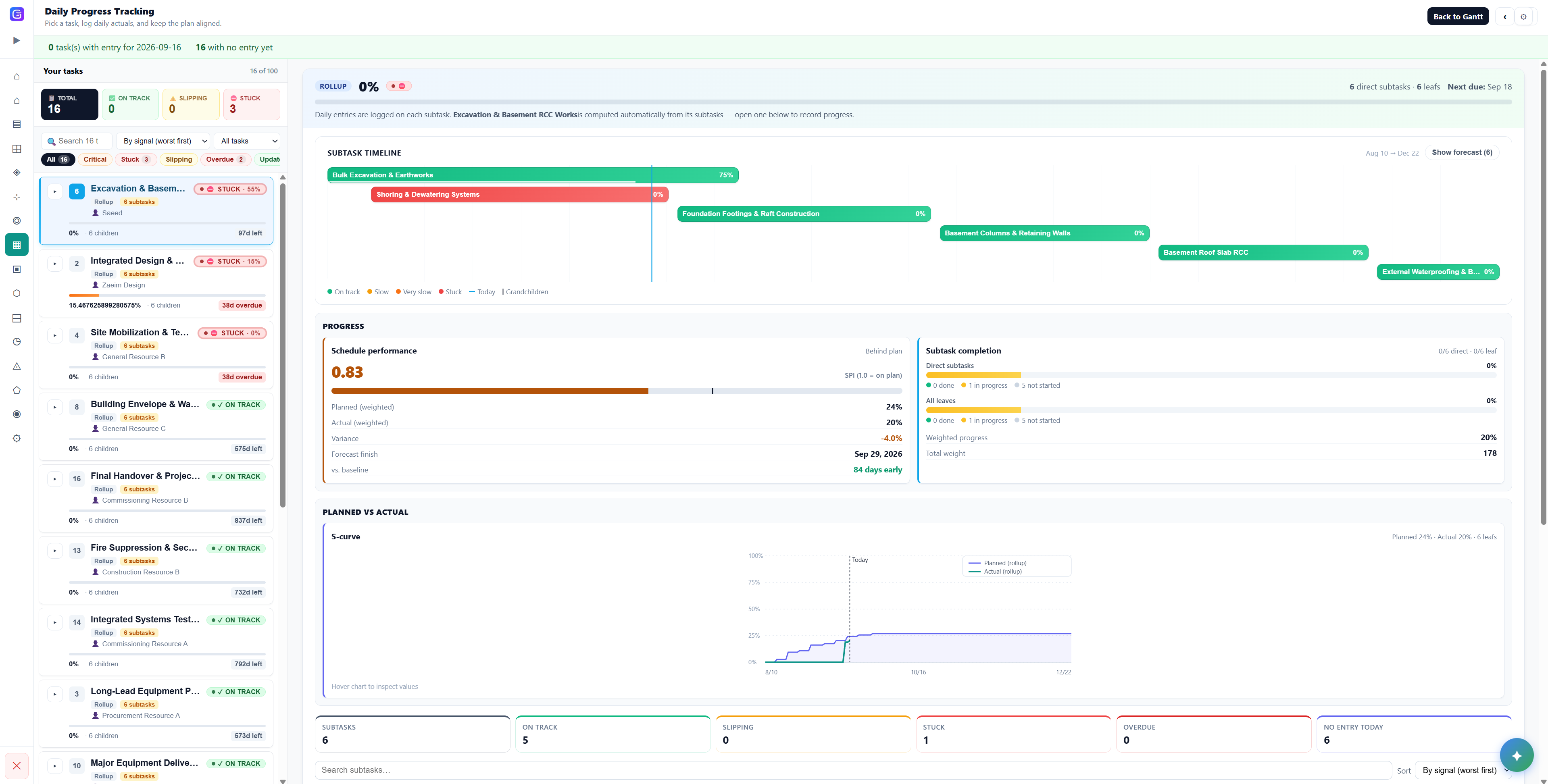
Daily Progress

From the work face to the dashboard, same day

Field updates roll up into control-tower dashboards: schedule health, progress, risks, and open issues — current every morning.

  • Per-task notes, % progress, time, and history
  • Raise-issue from the field with severity and escalation
  • AI status, risk, digest, and variance reports on demand
See all capabilities →
Gantivity daily progress tracking with subtask timeline, SPI, and S-curve

What schedule-linked DPRs change for each role

Site engineers

Minutes a day instead of an evening paperwork session. Update tasks from a phone at the work face, raise obstructions with one action, and keep a timestamped record that protects the people doing the work.

Project managers

A live picture every morning: what moved, what didn't, what's blocked. Delay prediction flags trending slips, and AI reports remove the weekly transcription ritual entirely.

Planners & project controls

Progress data arrives structured and per-activity, so schedule updates take minutes and variance narratives are generated, not reconstructed. See our project controls software →

The daily routine also builds something less tangible: digital discipline on site. Teams that report daily against a live schedule get faster at spotting their own slips — a point we expand on in construction site training. DPR software is one pillar of a broader platform; see construction project management software for how planning, field reporting, issues, and communication connect, and pricing for current plans.

Daily progress reports: common questions

What is a daily progress report (DPR) in construction?
A daily progress report is the structured record of what happened on site each day: work performed against planned tasks, percent progress, manpower and time, obstructions or issues, and notes. It is the primary evidence of project performance and the raw data behind schedule updates, payment claims, and delay analysis.
Why do paper and WhatsApp DPRs fail?
Because they produce unstructured data disconnected from the schedule. Photos of diary pages and chat messages cannot be queried, aggregated, or tied to specific schedule activities. Reports arrive late or not at all, issues get buried in threads, and when a dispute arises nobody can reconstruct what was actually reported on a given day.
How does Gantivity's DPR workflow work?
Each site engineer sees their assigned tasks from the live schedule. Daily, they record notes, percent progress, and time against each task, and can raise an issue directly from the work face. Every entry is timestamped and kept in a per-task history, and the update flows straight into the schedule, execution signals, and delay prediction.
Can Gantivity generate progress reports automatically?
Yes. Because daily updates live against the schedule, Gantivity's AI generates status reports, risk summaries, weekly digests, and schedule-variance narratives from live data on demand — no end-of-week copy-paste from site messages into a spreadsheet and then into slides.
How long does a daily update take for a site engineer?
A few minutes. The workflow is deliberately minimal: open your tasks, enter progress and notes, raise an issue if something is blocking. It is designed to be faster than typing the same information into a WhatsApp group, while producing structured, schedule-linked data instead of chat scroll.
Is there a DPR template we can start from?
Yes. We publish a free daily progress report template for construction on the Gantivity blog, covering the fields a defensible DPR should capture. Teams that outgrow the template move the same structure into Gantivity, where the reports assemble themselves from daily task updates.

Make the daily report the easiest part of the day

Early access is open for construction and infrastructure teams. Bring one project, run DPRs against a live schedule, and see the difference in a week.